Merge Images Online

Turn a scattered pile of photos into one tidy file, arranged exactly how you want it.

User avatarUser avatarUser avatar
1.5M users
17,150 reviews

Size up to 250 MB

How to Merge Images Online

Merge Images Online — Combine Photos Into One PDF File
1
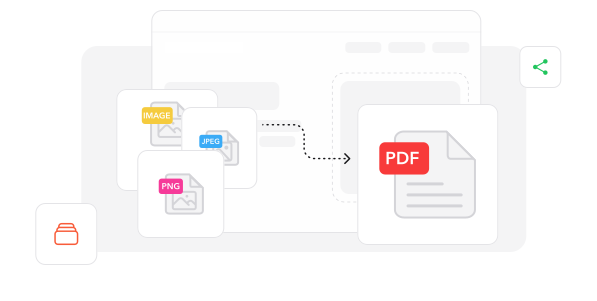
Drop Your Photos. Upload or drag & drop your images — JPG, PNG, HEIC, WEBP and plenty more, all in one go.
2
Set the Order. Shuffle your photos into the sequence you want, then hit merge. PDF Paw handles the rest.
3
Grab Your File. Download your combined file instantly — it's also waiting in your PDF Paw account.

Trusted by People Like You

See how our fellow users Merge Images with PDF Paw.

Dec 14
One file, zero headaches
Had 20 receipt photos to send my accountant. Merged them into a single file in under a minute. He was thrilled, honestly.
Marcus WhitfieldInstagram logo
Marcus Whitfield
Dec 5
The reordering sold me
Dragging photos into the right order is so simple. My portfolio finally looks the way I pictured it. No app to install either.
Sofia AlmeidaInstagram logo
Sofia Almeida
Nov 30
Quality held up perfectly
Merged a batch of high-res scans and expected them to come out soft. They didn't. Sharp as the originals. PDF Paw nailed it.
Tobias LindqvistInstagram logo
Tobias Lindqvist
824 people generated PDF files today
Loading...

Fully Integrated With

trusted by imagetrusted by imagetrusted by imagetrusted by image

Why choose our tool to Merge Images

Every Format Welcome

JPG, PNG, HEIC, WEBP, BMP, TIFF — throw them all in together. PDF Paw sorts out the formats so you don't have to convert a thing first.

Your Order, Your Call

Drag photos around until the sequence feels right. Changed your mind halfway? Reshuffle and merge again in a couple of clicks.

Merged in Seconds

No waiting around, no software to install. Upload your batch, and your single file is ready before your coffee cools.

Nothing Gets Squashed

Every photo lands at its original sharpness. PDF Paw combines your images without quietly compressing them into mush.

See It Before You Save

Preview the running order before you commit, so nothing shows up upside down or out of place in the final file.

Safe and Always Handy

Encrypted uploads, secure servers, and a copy kept in your PDF Paw dashboard — open it again from any device, whenever you need it.

Every Format Welcome

JPG, PNG, HEIC, WEBP, BMP, TIFF — throw them all in together. PDF Paw sorts out the formats so you don't have to convert a thing first.

Your Order, Your Call

Drag photos around until the sequence feels right. Changed your mind halfway? Reshuffle and merge again in a couple of clicks.

Merged in Seconds

No waiting around, no software to install. Upload your batch, and your single file is ready before your coffee cools.

Nothing Gets Squashed

Every photo lands at its original sharpness. PDF Paw combines your images without quietly compressing them into mush.

See It Before You Save

Preview the running order before you commit, so nothing shows up upside down or out of place in the final file.

Safe and Always Handy

Encrypted uploads, secure servers, and a copy kept in your PDF Paw dashboard — open it again from any device, whenever you need it.

Merge Images documents Online

Quick and easy, no software required

Merge Images Now
4.6
1,340 reviews
4.5
13,920 reviews
4.6
4,550 reviews

Frequently Asked Questions

Find quick answers to questions about getting the most out of our tool.

Check All Tools to work with PDFs

Related articles

Explore more tips, tools and guides to help you work smarter with PDFs.
Merge Images Online — Combine Photos Into One PDF File - PDF Paw